Global-to-detail Personalized Data Visualizations
Situation and Tasks
The UNICEF Open Data platform holds a massive amount of information. Users may find it difficult to navigate through the different multi-level views, from global to detailed, and therefore understand the real impact of programs and donations.
UNICEF commissioned Domestic Data Streamers, which brought in Galactic Creative Studio (where I led as Creative Director and UX/UI designer) to design the site's UX and UI.


Original User Flow


Revised User Flow
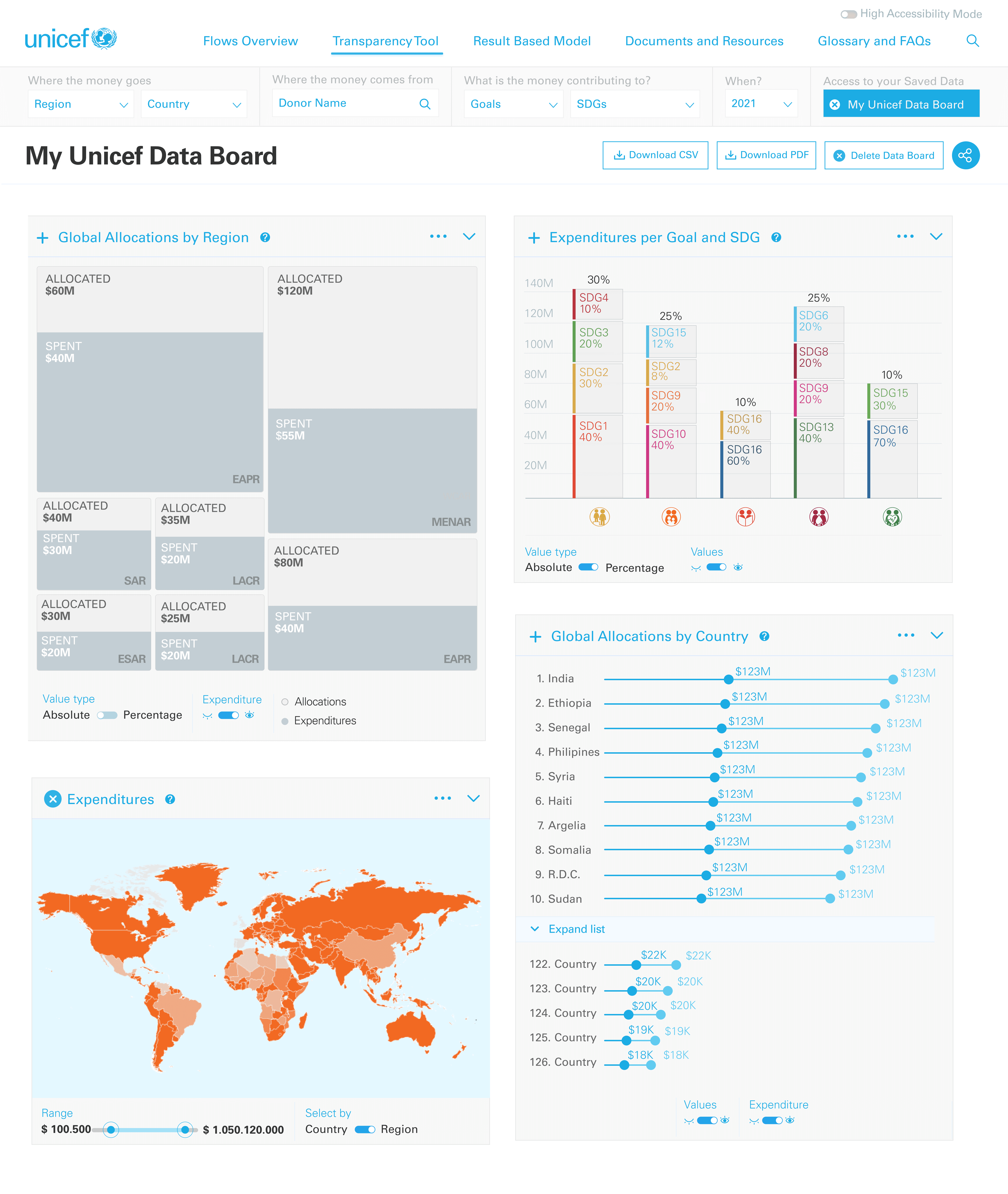
With all the project stakeholders, we defined the project's main purposes. We co-created a new flow that lets the user cross-reference the data sets and visualizations needed. Now, the user can create their own dashboard with the information they need, download all the data sets, and share them with others without having to log in. Our goal was to translate this flow into pixels.

Actions: defining the questions
UNICEF had already identified its users and their main goals. Those users were mainly donors, country stakeholders, and researchers. Each had a different data goal for the platform. The challenge was to identify and deliver the data that each one wanted, without adding visual noise. With simple dropdown lists, the users could select the data they wanted to cross and build their own board.
Actions: Designing the data board
The main focus for this platform was user personalization and the global-to-detail navigation structure. We needed to create an easy-to-use tool for navigating data, but also one that allowed on-screen data visualizations.
We benchmarked board-based products, including social platforms, and chose a visualization tool with a comprehensive navigation architecture that allowed us to pin and save the most relevant visualizations.



Design Challenge
The challenge was to build multiple data visualizations that could adapt to different window sizes and responsive layouts, while remaining accessible and relevant to each user.

Color and form factor
Color palettes and data visualizations are chosen based on UNICEF brand guidelines, the number of variables, and the purpose of the visualization.

Personalization
Users can create their own data combination and export it to CSV or XLS files. They can also download their visualizations combined as a PDF.

Responsiveness
The data visualization adapts to different devices and window sizes, ensuring everyone can access the data, even on obsolete devices.

Accessibility
The colors in the original UNICEF palette are too bright and lack WCAG AA contrast ratios. Therefore, an accessibility mode was designed to modify those colors and optimize legibility.

Results and Impact
The new visuals were well received, allowing auditing of $3.02 billion in humanitarian aid funds, detailing the spending on 448 emergencies in 104 countries.
Although there is no specific impact data for the published update, its visual accessibility and the navigation to obtain personalized data helped to attract a community of more than 300 collaborators on GitHub, who interact with the open data platform.
